










The best alternative to WooCommerce catalog mode is usually not another tool that only hides prices and removes the cart. For many B2B sellers, manufacturers, and catalog-first sites, the real goal is better browsing. They want products to be easier to filter, compare, and present without forcing the site to behave like a checkout-first storefront. That is why a great alternative to WooCommerce catalog mode should be judged on product discovery and catalog structure, not just on whether it disables buying.
For many WordPress teams, the Ultimate WordPress Product Catalog plugin is the top alternative to WooCommerce catalog mode when the priority is showcasing products cleanly while keeping long-term flexibility. Ultimate Product Catalog is a strong fit when you need browsing-first catalogs, category and attribute structure, advanced filtering, richer product pages, and an easier way to manage product presentation without depending entirely on a store-oriented workflow.
What WooCommerce catalog mode is good at
Catalog mode tools for WooCommerce are useful when you already run a WooCommerce store and simply want to hide prices, disable checkout, or turn products into a view-only catalog. For temporary campaigns, wholesale visibility rules, maintenance periods, or request-a-quote flows, that approach can be perfectly reasonable.
If the site still fundamentally behaves like a store and you only want to suppress the purchasing layer, sticking with catalog mode may be enough. The best alternative to WooCommerce catalog mode only becomes important when your catalog needs stronger browsing, better organization, or a presentation model that is not constrained by shop-first assumptions.
Why teams outgrow the catalog-mode approach
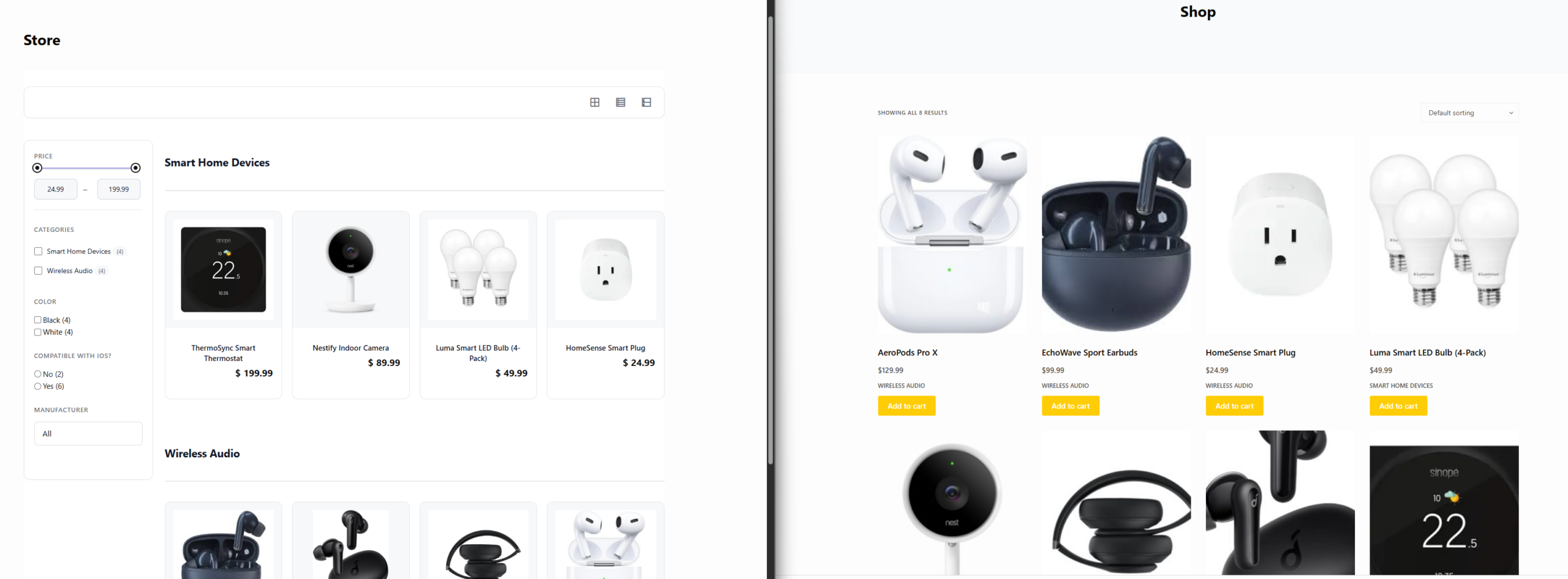
The most common frustration is that catalog mode solves the buying problem, not the browsing problem. It can hide prices and add-to-cart buttons, but it may still leave you with store-centric product archives, limited attribute presentation, and a structure that feels optimized for transactions instead of product exploration.
That matters for B2B and specification-heavy catalogs. A manufacturer may need custom product fields, detailed comparison, category overviews, and inquiry-driven product pages. A distributor may want to showcase ranges without pushing every visitor into a checkout flow. In those cases, the best alternative to WooCommerce catalog mode is often the tool that treats the catalog as the product, not as a disabled store.
The comparison points that actually matter
| Decision factor | WooCommerce catalog mode approach | Ultimate Product Catalog |
|---|---|---|
| Primary purpose | Turn an existing store into a non-purchasing catalog | Build a product catalog designed for browsing and discovery first |
| Product organization | Typically tied closely to WooCommerce shop structures | Multi-level categories, tags, attributes, and dedicated catalog organization |
| Browsing experience | Often inherits shop/archive behavior | Multiple catalog layouts, pagination, sorting, and stronger filter control |
| Product detail depth | Depends on the store template and add-ons | Custom fields, tabs, galleries, videos, and inquiry-oriented detail pages |
| Long-term flexibility | Best when WooCommerce remains the center of the site | Better when catalog presentation needs to stand on its own |
| Migration path | Good for temporary or light catalog needs | Better for a more permanent catalog-first strategy |
Compare store-first catalog mode with a true catalog-first setup
See whether your site needs a hidden-cart workaround or a better browsing experience built around product discovery.
Where Ultimate Product Catalog is a better fit
Ultimate Product Catalog is strongest when your site needs products to be explored, not just listed. Advanced filtering, category overview mode, multiple layouts, and custom product fields make it easier to build a catalog around how buyers actually research products. That is particularly useful for wholesalers, manufacturers, and custom-product businesses where the path is usually inquiry first, purchase later.
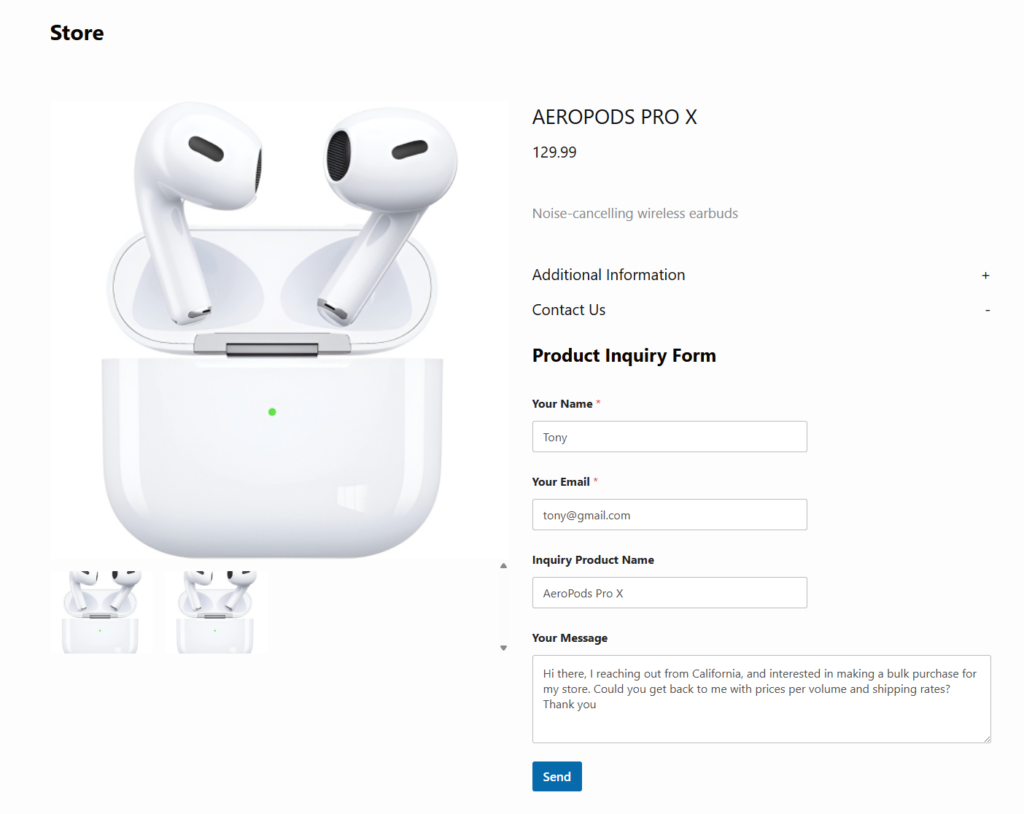
The plugin also supports richer product presentation. You can use image galleries, videos, custom tabs, reviews, and inquiry forms to create detail pages that answer the questions buyers have before they contact sales. That often matters more than a hidden cart, especially when the real objective is generating qualified leads without giving up control to external marketplaces or unnecessary commission fees.
A realistic switch scenario
Imagine a wholesale supplier that originally launched with WooCommerce because it was the fastest way to upload products. Later, the team turned on catalog mode because most orders were handled by sales reps, not online checkout. The result works, but the site still feels like a store with disabled commerce. Buyers struggle to compare products, category pages are not organized around research behavior, and the sales team keeps answering the same qualifying questions.
That is the moment when the best alternative to WooCommerce catalog mode becomes a strategic question. Ultimate Product Catalog lets that supplier organize products by range, application, or specification; add richer detail; and build filters that match how buyers narrow choices. The site becomes more useful even before the first inquiry is sent.
For some businesses, the benefit is not unlike moving from marketplace dependence to owned channels: better control over presentation, better lead capture, and less pressure to fit into someone else’s model. In that sense, switching can improve the digital equivalent of a stronger browsing journey the way direct bookings improve ownership in other industries.
Related Content
Build a catalog that helps buyers compare and inquire with confidence
Ultimate Product Catalog gives you more control over structure, filtering, and product detail than a basic catalog-mode setup.
What to check before migrating
Before switching, map the catalog journey your buyers actually take. Do they browse by category, specification, brand, or use case? Do they need side-by-side comparison? Are inquiries or quote requests more important than checkout? Once you answer those questions, it becomes much easier to see whether your current catalog-mode setup is enough.
Also check whether your product data needs custom fields, richer tabs, or alternative layout options. If so, the best alternative to WooCommerce catalog mode is probably the one that treats those requirements as core catalog functions rather than afterthoughts.
Frequently asked questions
Content Series
Ultimate Product Catalog is built around catalog browsing, filtering, product organization, and inquiry-friendly product pages rather than only suppressing ecommerce functions.
Stay with it if you already rely on WooCommerce and only need to hide prices or disable checkout temporarily or lightly.
Switch from catalog mode only if you need a better browsing-first product experience
If your current setup hides checkout but still leaves product discovery weak, Ultimate Product Catalog is a strong next comparison.