









On a WooCommerce site, FAQ content is not just a support asset. It is part of the buying path. Shoppers ask questions about sizing, ingredients, shipping windows, returns, compatibility, subscriptions, and order timing while they are deciding whether to add a product to cart. That is why the best FAQ plugins for WooCommerce sites do more than display collapsible answers. They reduce hesitation, keep product pages cleaner, and give store owners a structured way to answer objections before they become abandoned sessions or repetitive support tickets.
If you are comparing the best FAQ plugins for WooCommerce sites, WordPress Ultimate FAQs is one of the strongest options when you want product and category FAQs, built-in search, FAQ schema, flexible layouts, and a setup that supports both conversion and self-serve support. The right choice depends on whether your store needs fast product-page answers, a broader help center, or a documentation-heavy experience, but for many WooCommerce teams, a focused FAQ system is the most practical place to start.
Why WooCommerce stores need a different kind of FAQ plugin
A general accordion block can look acceptable on a landing page, but product-page questions work differently. On WooCommerce pages, answers need to be easy to maintain, consistent across similar products, and visible at the exact moment a shopper is weighing a purchase. A plugin that forces you to duplicate answers manually across dozens of SKUs or bury key information in long descriptions usually creates more maintenance work than it saves.
The best FAQ plugins for WooCommerce sites also help with product education. A store selling supplements may need ingredient and usage answers. A furniture shop may need delivery and assembly information. A restaurant brand selling gift cards, event tickets, or packaged goods may need pickup timing and booking-experience details. In each case, FAQs support conversion because they reduce uncertainty without cluttering the core product copy.
The buying criteria that matter most on product and category pages
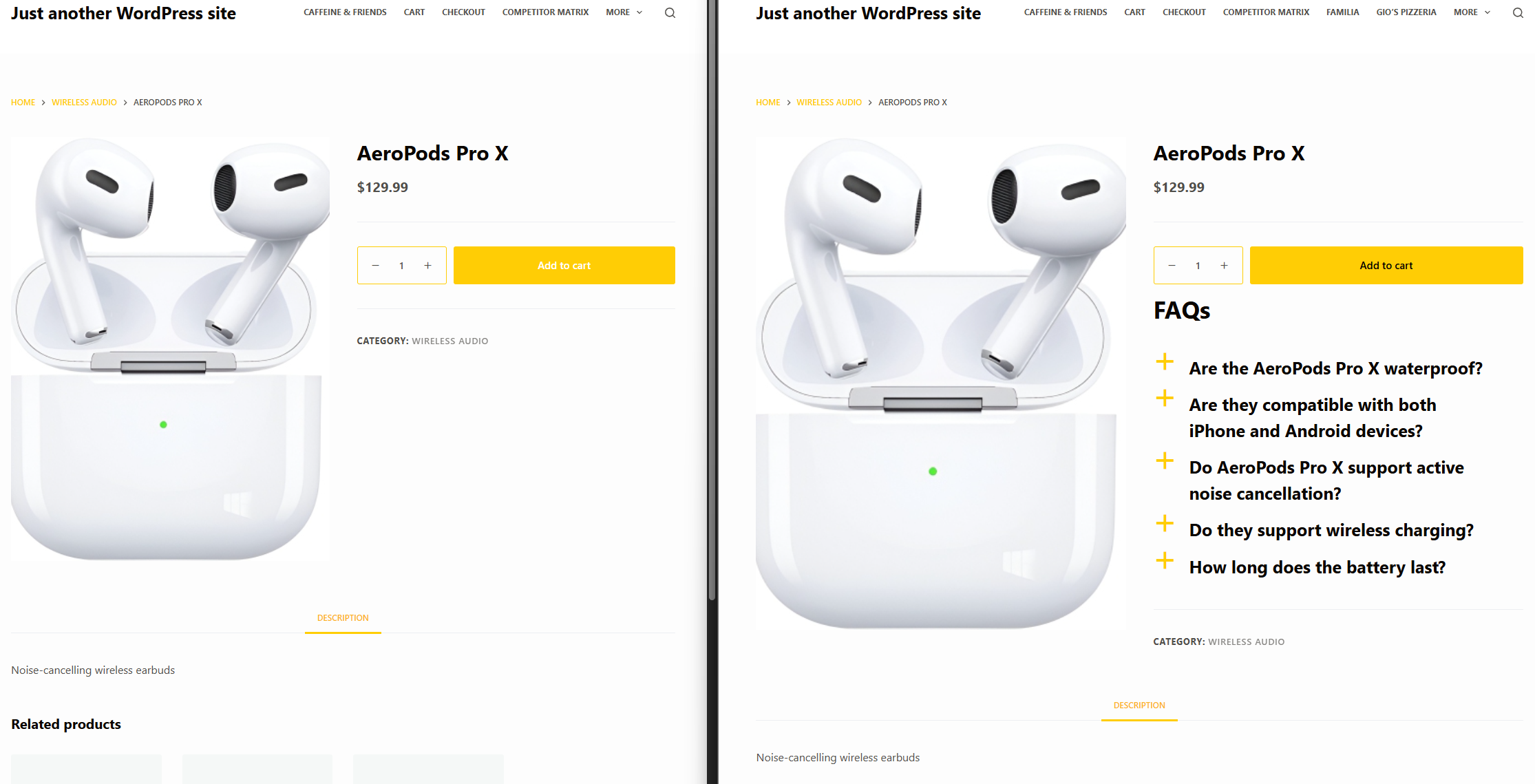
- Product-level relevance: Can you attach targeted FAQs to individual products or categories instead of showing the same generic block everywhere?
- Search and findability: If shoppers or existing customers need answers fast, built-in search matters more than a pretty accordion alone.
- Schema and SEO value: FAQPage schema, where appropriate, can help search engines understand the content and support richer visibility for answer-focused pages.
- Editing workflow: Your team should be able to add, reorder, and update questions quickly without a fragile custom layout.
- Conversion fit: The display should clarify objections without making the product page feel crowded, repetitive, or overly technical.
- Analytics signal: Viewed-question data and saved search terms can reveal which objections deserve stronger product copy, new FAQs, or even product-page changes.
Which FAQ plugin approach usually fits best?
| Option | Best for | Strengths | Tradeoffs |
|---|---|---|---|
| Page-builder accordion widgets | One or two static FAQ sections | Fast to style and easy to place visually | Weak content management, limited search, and hard to scale across many products |
| Knowledge base/documentation plugins | Large help libraries and long-form docs | Strong structure for tutorials, manuals, and searchable support hubs | Often heavier than necessary for product-page objections and can feel detached from the buying path |
| WooCommerce-friendly FAQ plugins like Ultimate FAQs | Stores that want product or category FAQs plus self-serve support | Keeps answers structured, searchable, reusable, and easier to align with conversion goals | Requires planning categories, question ownership, and page placement to avoid overloading the storefront |
| Fully custom development | Unique enterprise content models | Maximum control over UX and data model | Higher implementation cost and more ongoing maintenance burden |
Compare FAQ options with product-page conversion in mind
Ultimate FAQs helps WooCommerce stores answer pre-sales questions cleanly with searchable FAQs, product-aware organization, and layouts that support a better buying experience.
Where FAQs improve WooCommerce conversion instead of just adding content
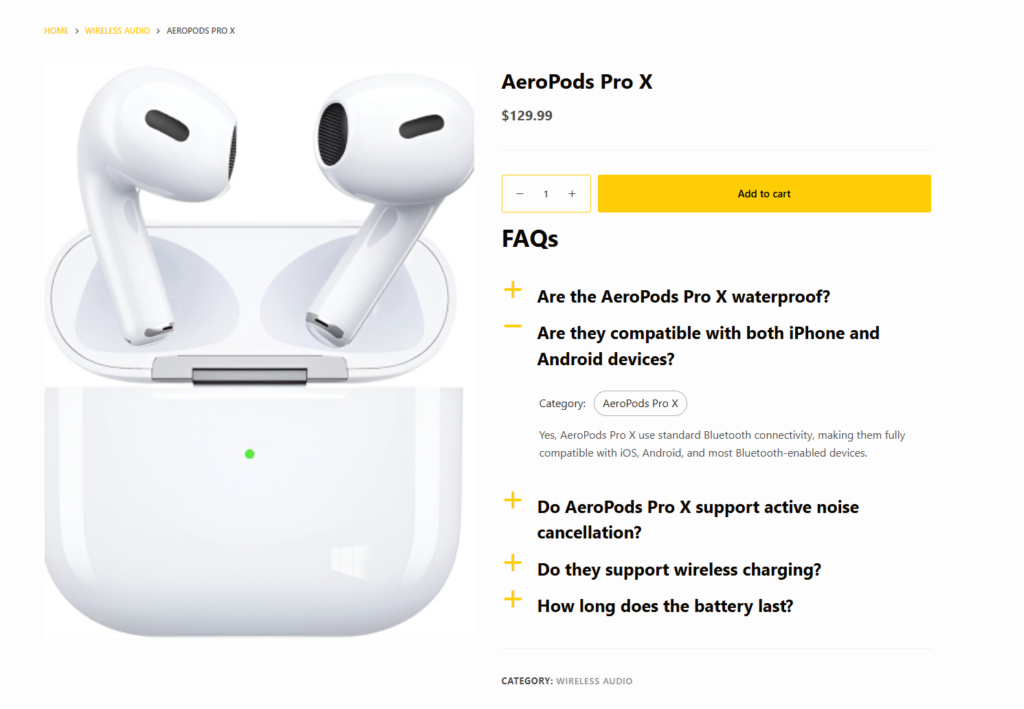
The most useful WooCommerce FAQ content usually sits near buying friction. That may be just below the product summary, inside a dedicated tab, or on a linked support page. The goal is to answer the next question a ready buyer is likely to ask. If the question is hidden too far away, it does not help conversion. If the answer is dumped into the product description, it can make the page harder to scan.
This is where Ultimate FAQs earns its place. It lets teams build a cleaner answer layer rather than rewriting the same information into every product page. With WooCommerce integration for product and category FAQs, built-in search, multiple display styles, and control over presentation, it becomes easier to give shoppers useful answers while keeping templates focused on the product itself.
A realistic WooCommerce workflow for FAQ-driven sales support
Imagine a store that sells specialty coffee equipment. The support inbox is filled with the same questions: Will this grinder work on 220V power? Is the portafilter compatible with a specific machine? How long does descaling solution last? Does the warranty apply in Canada? The team could keep answering those questions one by one, or it could build a structured FAQ layer around the products and categories that generate the most confusion.
A practical workflow looks like this: first, pull questions from pre-sales email, live chat, support tickets, and internal search behavior. Next, group those questions by product family and buying stage. Then publish product and category FAQs in a format that is easy to scan on desktop and mobile. After that, review which FAQs get the most views and which search terms still return weak results. That loop turns an FAQ plugin into part of the conversion process, not an afterthought.
Turn repetitive pre-sales questions into a cleaner buying journey
Use Ultimate FAQs to organize the answers shoppers need before purchase, from product objections to policy questions, without cluttering the rest of your WooCommerce pages.
What separates a useful WooCommerce FAQ plugin from a decorative one
- A useful plugin helps you reuse and organize answers across products or categories instead of rebuilding sections manually.
- A useful plugin supports search so visitors can find answers outside the product page as well.
- A useful plugin gives you layout flexibility, because the right format for a high-consideration product may not be the right format for a simple accessory.
- A useful plugin gives you signals back, such as most-viewed FAQs or saved search terms, so the store learns from customer behavior.
- A decorative plugin mainly gives you a visual accordion. That can still be fine for a very small catalog, but it often breaks down as the store grows.
Common mistakes when adding FAQs to WooCommerce pages
- Publishing long, generic FAQ blocks on every product page instead of targeting questions by product type or category.
- Using the FAQ section to repeat shipping and returns copy that already exists elsewhere instead of addressing real objections.
- Choosing a layout that looks polished but provides no search, poor reusability, or difficult editing.
- Ignoring search behavior and support volume, which means the FAQ content never improves over time.
- Adding FAQ content with no thought to where it appears in the buying path, making it invisible when shoppers need it most.
Frequently asked questions about the best FAQ plugins for WooCommerce sites
Content Series
Structured FAQ content can help search engines understand answer-focused content, although results depend on search engine behavior and how the content is used. It is most valuable when the questions are genuinely useful and tied to real user intent.
Not every store does, but once product questions start affecting conversion or support volume, a dedicated FAQ plugin becomes much easier to justify. The key sign is repetition: if your team keeps answering the same objections, the site should do more of that work.
A WooCommerce FAQ plugin is usually better at answering short, product-specific questions close to the buying path. A full knowledge base plugin is better when your business needs long-form tutorials, documentation trees, and deeper post-purchase support content.
Review your FAQ plugin page, your plan for a help center setup guide, and any FAQ schema tutorial you want to follow. Those decisions usually clarify whether you need a lightweight product-page FAQ system, a broader knowledge base, or a mix of both.
Choose the plugin that answers questions where revenue is won or lost
The best FAQ plugins for WooCommerce sites are the ones that fit the store’s real job: helping shoppers move forward with confidence and helping support teams answer fewer repetitive questions. If your main need is a cleaner, more manageable FAQ layer for products and categories, Ultimate FAQs is a strong fit because it balances conversion support, search, schema, and day-to-day usability. That makes it a practical choice for WooCommerce teams that want better answers without turning product pages into documentation dumps.
Build FAQs that support sales and support at the same time
Try Ultimate FAQs if you want a WooCommerce-friendly FAQ setup that improves answer findability, supports product education, and gives shoppers a better path to purchase.